
- Home
- Microsoft Certification
- MO-300 Exam
- Microsoft.MO-300.dumpsfiles Dumps
Free Microsoft MO-300 Exam Dumps Questions & Answers
| Exam Code/Number: | MO-300Join the discussion |
| Exam Name: | Microsoft PowerPoint (PowerPoint and PowerPoint 2019) |
| Certification: | Microsoft |
| Question Number: | 35 |
| Publish Date: | Oct 11, 2026 |
|
Rating
100%
|
|
Page: 1 / 7
Total 35 questions
Total 35 questions
For all slides, set the transition duration to 3 seconds.
Correct Answer:
See the steps below.
Explanation
Set the speed of a transitionSelect the slide that has the transition that you want to change. On the TRANSITIONS tab, in the Timing group, in the Duration box, type the number of seconds that you want it to run. If you want all the slide show's transition effects to use the same speed, click Apply To All.
Explanation
Set the speed of a transitionSelect the slide that has the transition that you want to change. On the TRANSITIONS tab, in the Timing group, in the Duration box, type the number of seconds that you want it to run. If you want all the slide show's transition effects to use the same speed, click Apply To All.
You are developing a sales presentation for Margie's Travel.
In the file properties, add ''Travel'' as a category.
Correct Answer:
See the Steps below
Explanation
To see more properties or statistics, click Project Information at the top of the page, and then click Advanced Properties or Project Statistics. On the Summary tab in the dialog box, you can add or edit the Title, Subject, Author, Manager, Company, , Keywords (also called Tags), and Comments.
Explanation
To see more properties or statistics, click Project Information at the top of the page, and then click Advanced Properties or Project Statistics. On the Summary tab in the dialog box, you can add or edit the Title, Subject, Author, Manager, Company, , Keywords (also called Tags), and Comments.
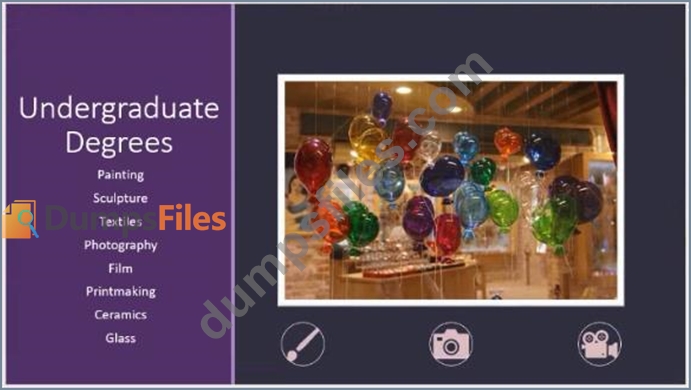
You are preparing a presentation for prospective students of the School of Fine Art.
On the Slide Master, duplicate the ''Blank'' slide layout. Name the new Slide layout ''Picture with Text''.
Insert a picture placeholder on the left and a text placeholder on the right.
The exact size and position of the placeholders do not matter. Do not create a slide based on the new slide layout.
Correct Answer:
See the Steps below
Explanation
In PowerPoint, a placeholder is a pre-formatted container on a slide for content (text, graphics, or video). The pre-set formatting makes it easier to format slides consistently.
You format a placeholder in Slide Master view. Then you use the placeholder-add content to it-in Normal view.
The pictured slide has two rectangular placeholders:
* The (upper) Title placeholder prompts the user for text and formats it in the default Heading font, size, and color
* The (lower) Content placeholder accepts text, or a table, chart, SmartArt graphic, picture, or video, as indicated by the clickable icons at its center.
Topic 1, Art SchoolExhibit.




Explanation
In PowerPoint, a placeholder is a pre-formatted container on a slide for content (text, graphics, or video). The pre-set formatting makes it easier to format slides consistently.
You format a placeholder in Slide Master view. Then you use the placeholder-add content to it-in Normal view.
The pictured slide has two rectangular placeholders:
* The (upper) Title placeholder prompts the user for text and formats it in the default Heading font, size, and color
* The (lower) Content placeholder accepts text, or a table, chart, SmartArt graphic, picture, or video, as indicated by the clickable icons at its center.
Topic 1, Art SchoolExhibit.
You are preparing a presentation about screen time for Try Research.
Hide slide 5.
Correct Answer:
See the steps below.
Explanation
Select the slide that you want to set the timing for. To make the slide advance to the next slide when you click the mouse, select the On Mouse Click check box. To make the slide advance automatically, select the After check box, and then enter the number of minutes or seconds that you want.
Explanation
Select the slide that you want to set the timing for. To make the slide advance to the next slide when you click the mouse, select the On Mouse Click check box. To make the slide advance automatically, select the After check box, and then enter the number of minutes or seconds that you want.
On the ''Travel Destinations'' slide, add the alt text description '' Ocean' to the image.
Correct Answer:
See the Steps below
* Do one of the following: Right-click the object and select Edit . Select the object. Select Format
> Alt Text. ...
* In the Alt Text pane, type 1-2 sentences in the the object and its context to someone who cannot see it.
* Do one of the following: Right-click the object and select Edit . Select the object. Select Format
> Alt Text. ...
* In the Alt Text pane, type 1-2 sentences in the the object and its context to someone who cannot see it.