
Join the discussion
Question 27/35
Refer to Exhibit.
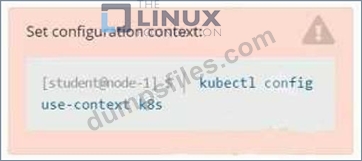
Set Configuration Context:
[student@node-1] $ | kubectl
Config use-context k8s
Context
You sometimes need to observe a pod's logs, and write those logs to a file for further analysis.
Task
Please complete the following;
* Deploy the counter pod to the cluster using the provided YAMLspec file at /opt/KDOB00201/counter.yaml
* Retrieve all currently available application logs from the running pod and store them in the file /opt/KDOB0020l/log_Output.txt, which has already been created
Set Configuration Context:
[student@node-1] $ | kubectl
Config use-context k8s
Context
You sometimes need to observe a pod's logs, and write those logs to a file for further analysis.
Task
Please complete the following;
* Deploy the counter pod to the cluster using the provided YAMLspec file at /opt/KDOB00201/counter.yaml
* Retrieve all currently available application logs from the running pod and store them in the file /opt/KDOB0020l/log_Output.txt, which has already been created
Correct Answer:
Solution:
To deploy the counter pod to the cluster using the provided YAML spec file, you can use the kubectl apply command. The apply command creates and updates resources in a cluster.
kubectl apply -f /opt/KDOB00201/counter.yaml
This command will create the pod in the cluster. You can use the kubectl get pods command to check the status of the pod and ensure that it is running.
kubectl get pods
To retrieve all currently available application logs from the running pod and store them in the file /opt/KDOB0020l/log_Output.txt, you can use the kubectl logs command. The logs command retrieves logs from a container in a pod.
kubectl logs -f <pod-name> > /opt/KDOB0020l/log_Output.txt
Replace <pod-name> with the name of the pod.
You can also use -f option to stream the logs.
kubectl logs -f <pod-name> > /opt/KDOB0020l/log_Output.txt &
This command will retrieve the logs from the pod and write them to the /opt/KDOB0020l/log_Output.txt file.
Please note that the above command will retrieve all logs from the pod, including previous logs. If you want to retrieve only the new logs that are generated after running the command, you can add the --since flag to the kubectl logs command and specify a duration, for example --since=24h for logs generated in the last 24 hours.
Also, please note that, if the pod has multiple containers, you need to specify the container name using -c option.
kubectl logs -f <pod-name> -c <container-name> > /opt/KDOB0020l/log_Output.txt The above command will redirect the logs of the specified container to the file.
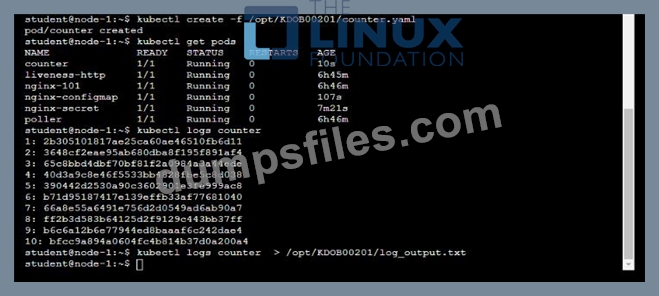

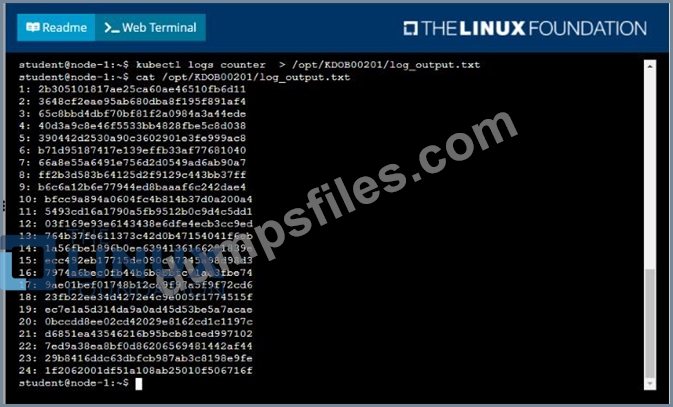
To deploy the counter pod to the cluster using the provided YAML spec file, you can use the kubectl apply command. The apply command creates and updates resources in a cluster.
kubectl apply -f /opt/KDOB00201/counter.yaml
This command will create the pod in the cluster. You can use the kubectl get pods command to check the status of the pod and ensure that it is running.
kubectl get pods
To retrieve all currently available application logs from the running pod and store them in the file /opt/KDOB0020l/log_Output.txt, you can use the kubectl logs command. The logs command retrieves logs from a container in a pod.
kubectl logs -f <pod-name> > /opt/KDOB0020l/log_Output.txt
Replace <pod-name> with the name of the pod.
You can also use -f option to stream the logs.
kubectl logs -f <pod-name> > /opt/KDOB0020l/log_Output.txt &
This command will retrieve the logs from the pod and write them to the /opt/KDOB0020l/log_Output.txt file.
Please note that the above command will retrieve all logs from the pod, including previous logs. If you want to retrieve only the new logs that are generated after running the command, you can add the --since flag to the kubectl logs command and specify a duration, for example --since=24h for logs generated in the last 24 hours.
Also, please note that, if the pod has multiple containers, you need to specify the container name using -c option.
kubectl logs -f <pod-name> -c <container-name> > /opt/KDOB0020l/log_Output.txt The above command will redirect the logs of the specified container to the file.
Add Comments

- Other Question (35q)
- Q1. (Exhibit) Task: A pod within the Deployment named buffale-deployment and in namespace gori...
- Q2. Context (Exhibit) Task A Deployment named backend-deployment in namespace staging runs a w...
- Q3. Context (Exhibit) Task You are required to create a pod that requests a certain amount of ...
- Q4. Context (Exhibit) Context You have been tasked with scaling an existing deployment for ava...
- Q5. Exhibit: (Exhibit) Task A deployment is falling on the cluster due to an incorrect image b...
- Q6. Context Anytime a team needs to run a container on Kubernetes they will need to define a p...
- Q7. Refer to Exhibit. (Exhibit) Task: 1) Fix any API depreciation issues in the manifest file ...
- Q8. (Exhibit) Given a container that writes a log file in format A and a container that conver...
- Q9. (Exhibit) Task: 1) First update the Deployment cka00017-deployment in the ckad00017 namesp...
- Q10. Context (Exhibit) Task Create a new deployment for running.nginx with the following parame...
- Q11. Exhibit: (Exhibit) Context As a Kubernetes application developer you will often find yours...
- Q12. Context (Exhibit) Context You are tasked to create a ConfigMap and consume the ConfigMap i...
- Q13. Exhibit: (Exhibit) Context You have been tasked with scaling an existing deployment for av...
- Q14. (Exhibit) Context A project that you are working on has a requirement for persistent data ...
- Q15. Refer to Exhibit. (Exhibit) Context Your application's namespace requires a specific servi...
- Q16. (Exhibit) Context You are tasked to create a secret and consume the secret in a pod using ...
- Q17. Refer to Exhibit. (Exhibit) Task: Modify the existing Deployment named broker-deployment r...
- Q18. (Exhibit) Task A Deployment named backend-deployment in namespace staging runs a web appli...
- Q19. Context (Exhibit) Context Developers occasionally need to submit pods that run periodicall...
- Q20. (Exhibit) Task: The pod for the Deployment named nosql in the craytisn namespace fails to ...
- Q21. (Exhibit) Task Create a new deployment for running.nginx with the following parameters; * ...
- Q22. (Exhibit) Context You have been tasked with scaling an existing deployment for availabilit...
- Q23. (Exhibit) Context Developers occasionally need to submit pods that run periodically. Task ...
- Q24. Context (Exhibit) Task: The pod for the Deployment named nosql in the craytisn namespace f...
- Q25. (Exhibit) Task You have rolled out a new pod to your infrastructure and now you need to al...
- Q26. (Exhibit) Task: Create a Pod named nginx resources in the existing pod resources namespace...
- Q27. Refer to Exhibit. (Exhibit) Set Configuration Context: [student@node-1] $ | kubectl Config...
- Q28. Exhibit: (Exhibit) Context A web application requires a specific version of redis to be us...
- Q29. (Exhibit) Context A container within the poller pod is hard-coded to connect the nginxsvc ...
- Q30. (Exhibit) Task: Update the Pod ckad00018-newpod in the ckad00018 namespace to use a Networ...
- Q31. (Exhibit) Context Your application's namespace requires a specific service account to be u...
- Q32. Context (Exhibit) Task: 1) Create a secret named app-secret in the default namespace conta...
- Q33. (Exhibit) Task: Create a Deployment named expose in the existing ckad00014 namespace runni...
- Q34. Exhibit: (Exhibit) Context A pod is running on the cluster but it is not responding. Task ...
- Q35. Refer to Exhibit. (Exhibit) Context You are asked to prepare a Canary deployment for testi...
