
Join the discussion
Question 3/20
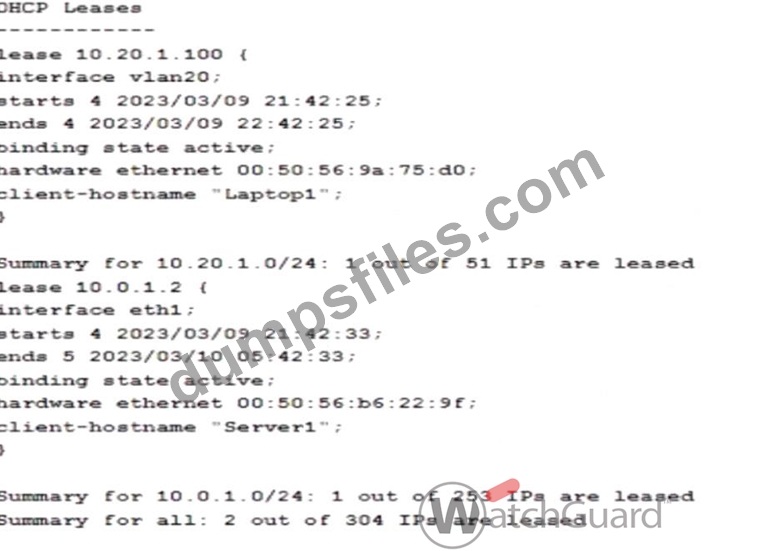
You configured your Firebox as a DHCP server and want to verify the status of the leased addresses. You found this information in Firebox System Manager > Status Report. What is true about DHCP leases in this deployment? (Select two.)
Correct Answer: B,D
Analyzing the DHCP lease information from the provided image:
* Lease Duration for 10.0.1.0/24 Network:
* The lease for IP address 10.0.1.2 on interface eth1 starts at 2023/03/09 21:42:33 and ends at 2023
/03/10 05:42:33, showing a lease duration of 8 hours. Thus, DHCP leases for the 10.0.1.0/24 network are set to be valid for 8 hours.
* Available IP Addresses in 10.0.1.0/24 Pool:
* The summary indicates that 1 out of 253 IPs is leased for the 10.0.1.0/24 subnet, meaning 252 IPs remain available in the address pool.
These details confirm the correct answers:BandD.
Other options, such as MAC address and hostname associations, do not match the data provided in the image, making them incorrect choices. Let me know if you need further assistance analyzing DHCP configurations on Firebox devices.
* Lease Duration for 10.0.1.0/24 Network:
* The lease for IP address 10.0.1.2 on interface eth1 starts at 2023/03/09 21:42:33 and ends at 2023
/03/10 05:42:33, showing a lease duration of 8 hours. Thus, DHCP leases for the 10.0.1.0/24 network are set to be valid for 8 hours.
* Available IP Addresses in 10.0.1.0/24 Pool:
* The summary indicates that 1 out of 253 IPs is leased for the 10.0.1.0/24 subnet, meaning 252 IPs remain available in the address pool.
These details confirm the correct answers:BandD.
Other options, such as MAC address and hostname associations, do not match the data provided in the image, making them incorrect choices. Let me know if you need further assistance analyzing DHCP configurations on Firebox devices.
Add Comments

- Other Question (20q)
- Q1. Match each WatchGuard Subscription Service with its function. (Exhibit)...
- Q2. You have five public IP addresses available from your ISP. When you create a Static NAT ac...
- Q3. You configured your Firebox as a DHCP server and want to verify the status of the leased a...
- Q4. With the policies configured as shown in this image, HTTP traffic can be sent and received...
- Q5. You lost access to a Firebox because no one knows the administrator passphrase. How can yo...
- Q6. A Firebox backup image includes certificates that were previously imported to the Firebox....
- Q7. Match each type of NAT with the correct descriptor (Exhibit)...
- Q8. The Audit Trail report shows information about Firebox configuration changes. How can you ...
- Q9. When you configure a Branch Office VPN tunnel to a third-party device, AES-GCM encryption ...
- Q10. If you have only one public IP address, can you use Static NAT to enable inbound connectio...
- Q11. The Firebox can scan the contents of encrypted zip files with Gateway AntiVirus when HTTPS...
- Q12. You configured a Firebox for a school environment. Students must have more restricted acce...
- Q13. Based on the configuration shown in this image, clients on the network can successfully co...
- Q14. Your users have no network connectivity on their computers in the 10.0.40.0/24 network. Yo...
- Q15. If the Firebox does not have a feature key installed, which of these statements are true? ...
- Q16. In a Mobile VPN configuration, why would you choose default-route (full tunnel) VPN instea...
- Q17. What type of NAT enables clients on a private network to connect to servers on the Interne...
- Q18. You can add your Firebox to WatchGuard Cloud but continue to manage it locally. When you d...
- Q19. You configured your Firebox interfaces and routes and want to verify the status of the rou...
- Q20. After you enable content inspection, your users cannot connect to the business-critical we...

[×]
Download PDF File
Enter your email address to download WatchGuard.Network-Security-Essentials.v2025-10-08.q20.pdf